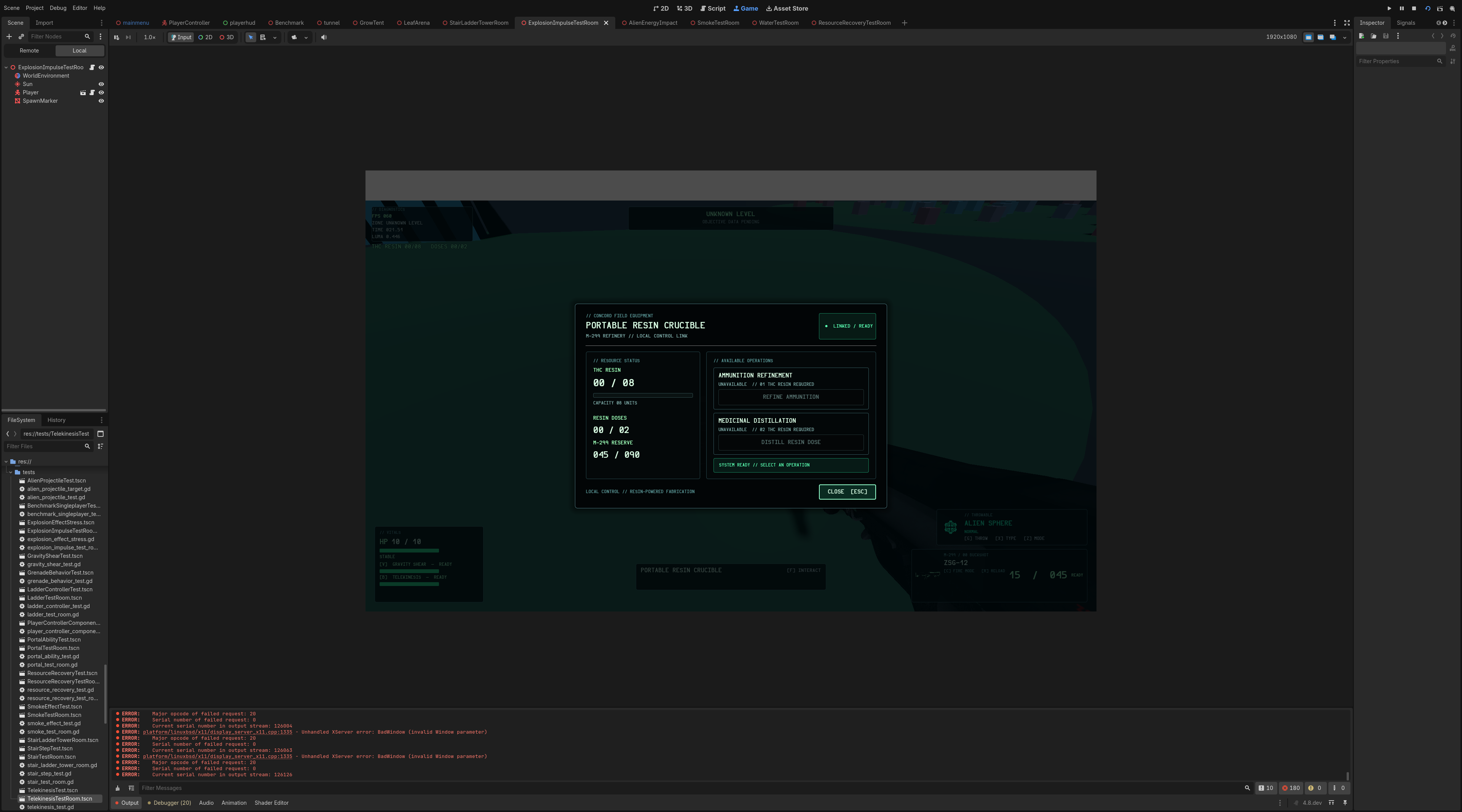
| 1 | # our crucible interact menu doesnt match the theme of the game, lets enhance it |
| 2 | |
| 3 | |
| 4 | |
| 5 | # Editable Crucible Console Menu |
| 6 | |
| 7 | ## Summary |
| 8 | |
| 9 | Move the Crucible menu’s visual hierarchy into ui/crucible_menu.tscn, leaving scripts/crucible_menu.gd responsible only for runtime data binding, action handling, state updates, and closing behavior. |
| 10 | |
| 11 | ## Scene Structure |
| 12 | |
| 13 | Create an editor-editable scene with: |
| 14 | |
| 15 | - Full-screen Control root using CrucibleMenu. |
| 16 | - Full-screen translucent shade. |
| 17 | - Centered responsive console panel. |
| 18 | - Header with: |
| 19 | - PORTABLE RESIN CRUCIBLE |
| 20 | - M-299 REFINERY |
| 21 | - Online/owner status readout. |
| 22 | |
| 23 | - Two-column content area: |
| 24 | - Resource status panel for THC resin, resin doses, and M-299 reserve ammunition. |
| 25 | - Operations panel containing refinement and distillation action cards. |
| 26 | |
| 27 | - Action cards with editable labels for: |
| 28 | - Cost. |
| 29 | - Output. |
| 30 | - Availability requirement. |
| 31 | - Button control. |
| 32 | |
| 33 | - Status feedback label for success and failure messages. |
| 34 | - Footer with ESC CLOSE. |
| 35 | - Scene-local style resources for panel surfaces, borders, bars, buttons, disabled states, and typography. |
| 36 | |
| 37 | All spacing, colors, fonts, text, minimum sizes, and layout behavior should be adjustable from the Godot editor. |
| 38 | |
| 39 | ## Script Changes |
| 40 | |
| 41 | - Replace runtime node construction in scripts/crucible_menu.gd with @onready references to the scene’s named controls. |
| 42 | - Preserve the existing setup(...), _close(), resource operations, input locking, and refresh behavior. |
| 43 | - Update only dynamic values at runtime: |
| 44 | - Resource counts and capacities. |
| 45 | - M-299 reserve. |
| 46 | - Action enabled/disabled states. |
| 47 | - Requirement text. |
| 48 | - Success/error status messaging. |
| 49 | |
| 50 | - Keep unavailable operations disabled with explanatory requirement text. |
| 51 | - Focus the first available action when the menu opens. |
| 52 | - Keep all crafting rules and resource costs unchanged. |
| 53 | |
| 54 | Update scripts/player/player_ui.gd to preload and instantiate ui/crucible_menu.tscn, passing the existing resources and crucible references into setup(...). |
| 55 | |
| 56 | ## Test Plan |
| 57 | |
| 58 | - Run the existing resource recovery test. |
| 59 | - Confirm the scene instantiates and still exposes the CrucibleMenu node. |
| 60 | - Verify opening and closing still locks/restores player input. |
| 61 | - Verify resource labels update after refining and distilling. |
| 62 | - Verify action buttons enable and disable correctly at resource limits. |
| 63 | - Verify success and failure status messages. |
| 64 | - Manually inspect the scene in the Godot editor and test it at both 1920×1080 and smaller viewport sizes. |
| 65 | |
| 66 | ## Assumptions |
| 67 | |
| 68 | - ui/crucible_menu.tscn becomes the single source of truth for the menu’s visual layout. |
| 69 | - No new raster assets are required. |
| 70 | - Existing public menu methods remain compatible with current callers and tests. |
| 71 | - The menu continues using the HUD console visual language: near-black translucent panels, teal borders, Hermit typography, mint highlights, and amber warnings. |
blackbeard420 / promptplan
Last active 1 month ago
Revision b3e58519e9ef647126b415dd323f4e5b81e7a835